
AI image generator
Turn any prompt into a photoshoot.
ContentWave’s AI image generator creates studio portraits, influencer shots, pet photoshoots and product photos from a short description. Add up to five of your own photos and it can put you, a friend, your pet or your product in the scene.
Free to download on iPhone and Android.
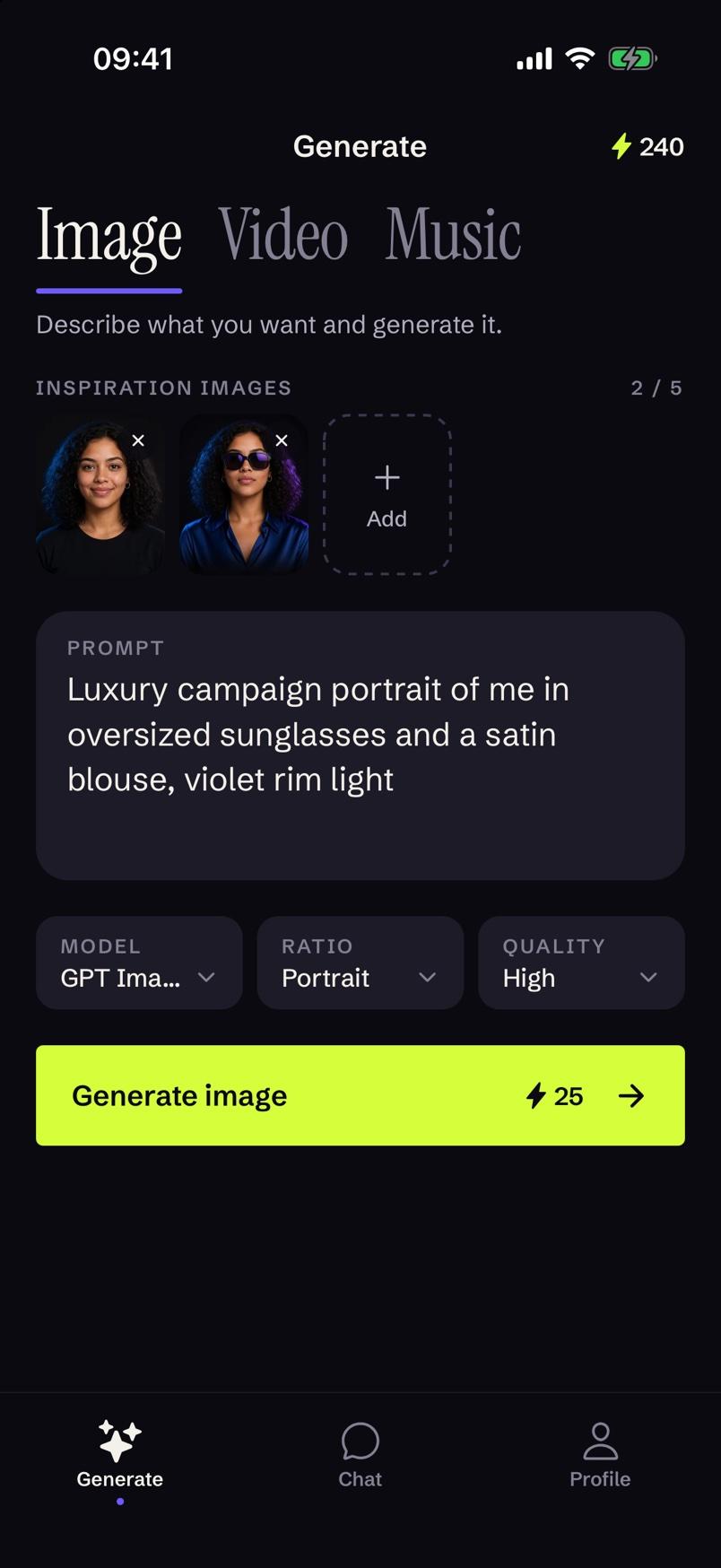
How it works.
Step 01
Add inspiration photos
Upload up to five photos of yourself, a friend, a pet or a product. Or skip this step and start from text alone.
Step 02
Describe the scene
Say what you want to see: the setting, outfit, lighting and mood. You can write in any of the app’s 11 languages.
Step 03
Choose a model and generate
Pick a model, an aspect ratio and draft, standard or high quality. Your image is saved to your library, ready to save to Photos or share.
What you can make.
Studio portraits
Editorial headshots and fashion portraits with studio lighting, made from everyday selfies.
AI influencer content
Travel, fitness, fashion and lifestyle shots for a persona or your own feed.
Portraits together
Put yourself and a friend or partner in the same photo, anywhere you like.
Pet photoshoots
Your pet as a chef, a CEO, a dapper gent or in full costume.
Product shots
Packaging, fragrance, footwear, food and beauty shots for your shop, ads or socials.
Animated worlds
Characters, creatures and sets for an animated series.
The models.
Pick the model for each generation. The line-up changes as better models are released.
GPT Image 2
OpenAI’s latest model with excellent prompt understanding.
Nano B2 Pro
Fast, high-quality general-purpose image generation.
Flux Kontext
Context-aware generation and editing from references.
Seedream 4.5
Photorealistic, richly detailed imagery.
Questions, answered.
Can I use my own photos?
Yes. Add up to five photos as inspiration and ContentWave uses them as a reference for the people, pets or products in the new scene. Only upload photos of people who have given you permission.
Which aspect ratios are available?
Square (1:1), portrait (4:5), landscape (3:2), widescreen (16:9) and vertical (9:16), which fits TikTok, Reels and Stories.
What do draft, standard and high quality mean?
Draft is the fastest with lower detail, standard is the recommended balance, and high gives maximum detail but takes longer. Some models cost more credits at higher quality.
How many credits does an image cost?
Most images cost between 5 and 25 credits, depending on the model and quality. The exact cost is shown before you generate.
Which model should I choose?
GPT Image 2 is best at following detailed prompts, Seedream 4.5 at photorealism, Flux Kontext at edits based on your reference photos, and Nano B2 Pro at fast, all-round results.
Explore more.
Get the app
What are we making today?
Download ContentWave free, then subscribe to ContentWave Pro for the credits to generate.